Posts

How to fix the Unbound module Graphics in an ocaml project
Image
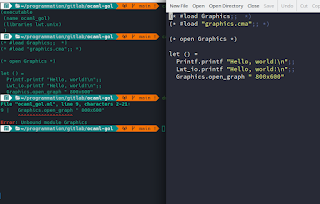
From ~/pr/gitl/ocaml-gol In a constant effort to learn new programming languages, I'm currently trying to use ocaml , a free and open-source general-purpose, multi-paradigm programming language maintained at the Inria . It's basically an extension of Caml with object-oriented features. I'm mostly interested by its functionnal and pattern matching features but the module part of the language can be a bit difficult to understand for someone with little to none ML (Meta Language) background.   The error When trying to use the graphics module to create a graphical window and go just a little further than the simplest helloworld program, here is the result : If the project uses dune : (executable (name ocaml_project) (libraries lwt.unix graphics) ) with this code : let () = Printf.printf "Hello, world!\n";; Lwt_io.printf "Hello, world!\n";; Graphics.open_graph " 800x600";; The first times I built this project running the du...

How to generate a file from a template using cmake

Image
If you use cmake to configure a project, whatever the programming language the project is written in, you can and certainly already use the configure_file() cmake function to copy a file and modify its content using variables substitution. The configure_file function While this trick is generally used to generate, often plateform-dependant config.h from a config.h.in template, it can be used to generate arbitrary file using variable substitution. For example, Doxyfile , the file used to generate doxygen API documentation Destination directory You can also change the destination directory of the file. For example, often, we use a build/ subdirectory to call cmake from to avoid project source tree pollution : configure_file( "${PROJECT_SOURCE_DIR}/config.h.in" "${PROJECT_BINARY_DIR}/config.h" ) The variables are PROJECT_SOURCE_DIR and PROJECT_BINARY_DIR to change the source and destination directory of the generated file. If you...

How to recover deleted files under GNU/Linux

Image
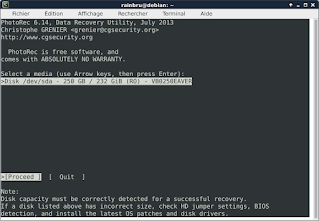
By mystake, I called rm on a complete directory and the result is awful and predictable : all files were correctly deleted. Just after, I searched for a solution. Install needed package We will use a free and open source software licensed under GPL v2+ called TestDisk . First, install the testdisk package using your distribution's package manager. On debian -based systems : sudo apt install testdisk or on arch -based distributions such as manjaro : sudo pacman -S testdisk Gathering informations Before starting the restoration process, you'll need some informations : The df -m command can help you find this information from the mount point the deleted file was on : Filesystem 1M-blocks Used Available Use% Mounted on udev 4949 0 4949 0% /dev tmpfs 999 10 990 1% /run /dev/sda1 23339 10168 11963 46% / tmpfs 4993 173 4820 4% /dev/shm tmpfs 5 1 ...

How to make a modal dialog using Ogre/CEGUI

Image
RainbruRPG is an open-source MMORPG project I'm working on since someday in early 2010's. I already posted multiple posts on this project (for example here and here ). While its development is actually in pause for a while now, it is a great project to learn using new 3D/UI oriented libraries. CEGUI (short for Crazy Eddie's GUI System ) is one of these libraries. It is a free MIT-licensed windowing and widgets library that run on top of Ogre3D but it can also run on other backends. The RainbruRPG's not yet implemented modal dialog The modal need While CEGUI is a great library to create windows and complex screen, I need a standard dialog for NYI (Not Yet Implemented) features. For this, I'll try to create a modal dialog, i.e. a dialog with a blocking exec() function and a return value. It can have multiple buttons, each possibly with a different value but the blocking execution is needed : ModalDialog md; if (md.exec()) { // handle positive eve...

How to pass a std::string as a void* parameter

Image
This issue comes from some research for RainbruRPG while working with openssl function (see NewProfile class). This C function is waiting for a void* parameter as passphrase, and I'm getting the user-entered password as a std::string .   The problem is, if you try to pass it directly, use get the following error : error: cannot convert 'std::string' {aka 'std::__cxx11::basic_string '} to 'void*' To pass it to the legacy void* function, you just need to pass a pointer to the first element of the string : #include <string> #include <iostream> void waiting_for(void* str) { using std::cout; using std::endl; // You have to cast it or you'll print the pointer // address instead of the string content cout << (char*)str << endl; } std::string passphrase = "whatever"; waiting_for(&passphrase[0]); This trick also works with char* but you have to cast the result (at least on g++ ) to av...

How to fix the meteor/mongodb locale issue

Image
The mrt-manager homepage When trying to run mrt-manager , a  meteorjs project, on a newly installed Debian Stretch , I had the following issue : Unexpected mongo exit code 1. Restarting. Unexpected mongo exit code 1. Restarting. Unexpected mongo exit code 1. Restarting. Unexpected mongo exit code 1. Restarting. Unexpected mongo exit code 1. Restarting. Can't start Mongo server. MongoDB failed global initialization I got this issue when trying to work on mrt-manager after a fresh Debian install. This issue is due to a missing locale , a set of language/country code pair used to define user interface language in i18n context. You probably installed your favorite GNU/Linux distribution in your native language and you didn't installed the english locale. Edit the /etc/locale.gen as root and uncomment the following line : en_US.UTF-8 UTF-8 Then execute the following command as root : #locale-gen Now, reboot the computer and mongodb should start.

Dev's not dead

Image
I'm not dead yet and neither is my code. This blog, however is, and I will try to fix that.   Actual state The truth is that, these days, I was more into streaming and competitive programming than traditionnal, more serious development. I splitted my dev repos in two different accounts, bitbucket for all professional-related and old work and a « new » gitlab account, used for game-related ans streamed repositories. While my old dev name remains *rainbru*, my new streamer name is now discontinued. The new repositories will created at github with a big focus on company/industry-related project, mainly written in C++,ruby,perl and JS. This will give daily commit if I can, side by side with an active work on freecodecamp and mit's ocw daily work tyo heavently have some certifications. Reactivation So, I'll try to reactivate this blog, trying to post some dev-related articles more than once in a five years span. Btw, today is also my birthday -- yippee!

How to use codecov.io in a C/C++ project

Image
If you need a good code coverage  web reporting tool for a github-hosted project, codecov.io may be your next best friend. I'm already using it on  biology  and  rainbrurpg ). The present article is usable on a C/C++ project using cmake as build system and travis-ci as CI platform. Codecov.io screenshot Handling coverage in cmake You first need to install some package (at least on Debian GNU/Linux) : sudo apt install gcov lcov gcovr Then, copy the  CodeCoverage.cmake in a cmake/ directory inside your project's repository and add this line to your CMakeLists.txt file: set(CMAKE_MODULE_PATH ${CMAKE_MODULE_PATH} ${CMAKE_CURRENT_SOURCE_DIR}/cmake) Generate coverage reports and send them Now, you need to modify your .travis.yml file and add this : after_success: # Creating report - cd ${TRAVIS_BUILD_DIR} - lcov --version - lcov --directory . --capture --output-file coverage.info - lcov --remove coverage.info '/usr/*' --output-fil...