Posts

How to fix the Unbound module Graphics in an ocaml project
Image
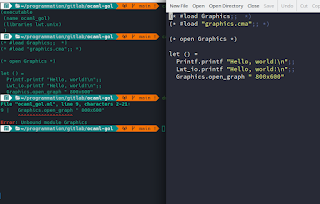
From ~/pr/gitl/ocaml-gol In a constant effort to learn new programming languages, I'm currently trying to use ocaml , a free and open-source general-purpose, multi-paradigm programming language maintained at the Inria . It's basically an extension of Caml with object-oriented features. I'm mostly interested by its functionnal and pattern matching features but the module part of the language can be a bit difficult to understand for someone with little to none ML (Meta Language) background.   The error When trying to use the graphics module to create a graphical window and go just a little further than the simplest helloworld program, here is the result : If the project uses dune : (executable (name ocaml_project) (libraries lwt.unix graphics) ) with this code : let () = Printf.printf "Hello, world!\n";; Lwt_io.printf "Hello, world!\n";; Graphics.open_graph " 800x600";; The first times I built this project running the du...

How to capture ruby console output

Image
While writing unit tests for a ruby project, headers-date , I had to unit test a function that print some useful debugging informations in terminal using IO#puts stdlib function. This code originally was posted to the following google group . The tested class Let's imagine a to-be-tested class that use puts , print or p IO methods to print some text to stdout (or stderr ). class TestMe def print puts "Some useful text" end end The capture trick To help testing the printed text, we will implement a new function called util_capture . It simply temporarily replace both $stdout and $stderr variables. The dollar sign prefix (sometimes called a sigil )in ruby is used to identify global variables . Here are really sparce official documentation on $stddout and $stderr The yield keyword will be replaced by your block. def util_capture require 'stringio' orig_stdout = $stdout.dup orig_stderr = $stderr.dup captured_stdout = ...

How to create a C++ Singleton using the boost serialization library

Image
A singleton is a class that can only be instantiated once. The design pattrern restricts the class to one single instance and further access will always return the same, first one. As explained in the singleton.html page, the boost serialization library has a Singleton class defined in the shipped Singleton.hpp C++ header. Dependencies On arch -based distributions, such as manjaro , this header is part of the extra/boost package. On Debian Bullseye , it is part of the libboost1.74-dev one but it's a dependency of the libboost-dev dependency package. So, according to your distribution, use the needed command : sudo pacman -S boost or sudo apt-get install libboost-dev Usage As seen in the boost class interface documentation, to use it, you just have to create a class that inherits the singleton one. Here is an example class that use boost's singleton to ensure one and only one instance will be in use : #include <boost/serialization/singleton.hpp> ...

Using the fox toolkit FileDialog static public functions

Image
This trick comes from a brand-new project I hosted at github : elecrud , more specifically the MainWindow::onFileOpen() method you can find in the src/editor/MainWindow.cpp file.   The dialog class The FXFileDialog class reference can be found online here for the 1.6 version of the fox toolkit library. So, obviously, you could instantiate FXFileDialog but the simplest way to use it is to use Static Public Member Functions , for example getSaveFilename() or getOpenFilename() : FXString filename = FXFileDialog::getOpenFilename(this, "Open a project...", "~"); // use filename here The owner class The only limitation is that you must have a valid owner as first parameter. If you try nullptr you may have a silly segmentation fault . The simplest solution is to call it from a class that inherits a Fox class, for example a MainWindow : class MainWindow : public FXMainWindow { // Macro for class hierarchy decla...

Introducing elecrud, a C++/electron based multi-user CRUD operator generator

Image
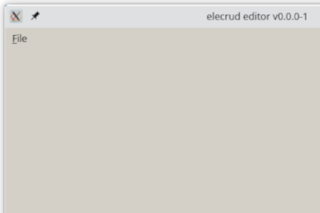
Well, this name is a bit weird but the project's still cool and since it's a new project, here it is : elecrud is a C++ fox-toolkit-based multi-user CRUD operator electron application generator. The goal is to create a lightweight yet portable graphical application used to edit and generate an electron application used to feed and edit a persistant set (i.e. a database) via standardized CRUD operations. Presentation This project is mainly a way to keep learning fox-toolkit , a very lightweight, open source and cross-platform widget toolkit libray licensed under LGPL. The main advantage of this toolkit, apart being lightweight is to have the same lookn-n-feel on all plateforms. While the first steps of the project seems pretty straightforward ( mainwindow and menu stuff), project serialization thing, the electron application squeleton and generation may fastly become challenging. The application is available under GPL v3 or later and hosted at github : https:/...

How to handle loading progress using PubSub design pattern

Image
In the RainbruRPG 's LocalTest class, we show the map generation progress from libRLGL using a LoadingBar. The loading informations simply come from a Publisher/Subscriber design pattern from the LoadingBarListener override. Following examples are obviously implemented in C++. It should correctly build on every compiler with, at least, C++11 support. The PubSub design pattern This design pattern involves at least three classes. Here is an example UML diagram done with umbrello , a free and open source UML modeler licensed under GPL 2 or later : In this example, the Publisher class will be able to send message to an arbitrary list of classes that inherits the Listsner abstract type. From the Publisher point of view The publisher side needs at least a base class to be overridden by the subscriber and a list of subscribers : #include <vector> class Listener { public: virtual void message1()=0; virtual void message2()=0; virtual void message3()=0; }...

How to generate a file from a template using cmake

Image
If you use cmake to configure a project, whatever the programming language the project is written in, you can and certainly already use the configure_file() cmake function to copy a file and modify its content using variables substitution. The configure_file function While this trick is generally used to generate, often plateform-dependant config.h from a config.h.in template, it can be used to generate arbitrary file using variable substitution. For example, Doxyfile , the file used to generate doxygen API documentation Destination directory You can also change the destination directory of the file. For example, often, we use a build/ subdirectory to call cmake from to avoid project source tree pollution : configure_file( "${PROJECT_SOURCE_DIR}/config.h.in" "${PROJECT_BINARY_DIR}/config.h" ) The variables are PROJECT_SOURCE_DIR and PROJECT_BINARY_DIR to change the source and destination directory of the generated file. If you...

How to recover deleted files under GNU/Linux

Image
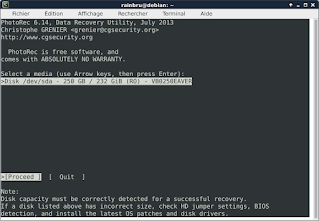
By mystake, I called rm on a complete directory and the result is awful and predictable : all files were correctly deleted. Just after, I searched for a solution. Install needed package We will use a free and open source software licensed under GPL v2+ called TestDisk . First, install the testdisk package using your distribution's package manager. On debian -based systems : sudo apt install testdisk or on arch -based distributions such as manjaro : sudo pacman -S testdisk Gathering informations Before starting the restoration process, you'll need some informations : The df -m command can help you find this information from the mount point the deleted file was on : Filesystem 1M-blocks Used Available Use% Mounted on udev 4949 0 4949 0% /dev tmpfs 999 10 990 1% /run /dev/sda1 23339 10168 11963 46% / tmpfs 4993 173 4820 4% /dev/shm tmpfs 5 1 ...